Sign in or register
You'll be able to write comments and posts, like content, and much more
Search
Dark theme

Posts by tag: JavaScript

Por qué return await en JS no siempre es malo, sino todo lo contrario: es lo correcto

Algunos desarrolladores de JS se hacen los listos y dicen que en vez de:
return await someService.doSomething();
hay que escribir:
return someService.doSomething();

O sea, si una función async devuelve una promesa en su return, el resultado de resolver esa promesa se convierte automáticamente en el valor de retorno real. Es decir, las promesas se "desempaquetan" de forma recursiva.

Todo esto suena bien, pero hay un problema bastante serio. Miren este código:
// Técnicamente esta función devuelve una promesa,
// pero en realidad lanza un error
async function fun1() {
  throw new Error('Hi from Famabara!');
}
(async () => {
  try {
    return await fun1();
  } catch (err) {
    console.log('Error catched!', err);
  }  
})();

Aquí todo va bien, el error se captura en el bloque catch. Pero si lo escribimos así:
async function fun1() {
  throw new Error('Hi from Famabara!');
}

try {
  (async () => {
    try {
      return fun1();
    } catch (err) {
      console.log('Error catched!', err);
    }  
  })();
} catch (err) {
  console.log('Error catched!', err);
}
¡entonces ninguno de los dos bloques catch captura el error! Esto es una desventaja tremendamente grave. El error simplemente no se puede capturar de ninguna manera, a menos que uses el método catch() directamente sobre la promesa, si no escribes await.

En fin, la recomendación de no escribir return await es una muy mala recomendación. Directamente perjudicial.
Show full...
+1
4

Warum return await in JS nicht immer schlecht ist, sondern im Gegenteil sogar richtig

Manche JS-Entwickler tun schlau und behaupten, dass man statt:
return await someService.doSomething();
lieber schreiben sollte:
return someService.doSomething();

Nach dem Motto: Wenn eine async-Funktion in ihrem return ein Promise zurückgibt, wird ja sowieso das Ergebnis der Auflösung dieses Promises zum eigentlichen Rückgabewert. Promises werden also quasi rekursiv "entpackt".

Das klingt erstmal plausibel, aber es gibt ein ziemlich ernstes Problem dabei. Schaut euch mal diesen Code an:
// Technisch gibt diese Funktion ein Promise zurück,
// wirft aber in Wirklichkeit einen Fehler
async function fun1() {
  throw new Error('Hi from Famabara!');
}

(async () => {
  try {
    return await fun1();
  } catch (err) {
    console.log('Error catched!', err);
  }
})();

Hier ist alles in Ordnung, der Fehler wird im catch Block abgefangen. Schreibt man es aber so:
async function fun1() {
  throw new Error('Hi from Famabara!');
}

try {
  (async () => {
    try {
      return fun1();
    } catch (err) {
      console.log('Error catched!', err);
    }  
  })();
} catch (err) {
  console.log('Error catched!', err);
}
dann fängt keiner der beiden catch Blöcke den Fehler ab! Das ist ein wirklich heftiger Nachteil. Der Fehler lässt sich dann gar nicht mehr abfangen - man müsste zwingend catch() direkt auf dem Promise aufrufen, wenn man kein await verwendet.

Kurz gesagt: Die Empfehlung, kein return await zu schreiben, ist eine sehr schlechte Empfehlung. Geradezu schädlich.
Show full...
+1
3

Забудьте про ESLint, используйте Oxlint как основной линтер в JS/TS

На проекте разрешили попробовать сменить ESLint на Oxlint. После первого запуска я выпал, даже не понял, что программа отработала 😄 Настолько съело быстро, что не замечаешь, т.е. нажимаешь Enter и уже сразу результат. Ты вообще не ждешь. 😎

Короче, не будем пробовать менять, будем полностью менять на о-экс-линт без попробовать. Зачем нужен еслинт теперь? Каждый коммит - медленная проверка, линтер в ci/cd - медленная проверка. У нас теперь все будет летать.

Сколько выполняется линтинг на eslint? Запускаю через time:
time npm run lint

real    0m10,108s
user    0m12,620s
sys     0m1,264s
Выполняется 12-13 секунд. Секунд!!! Это 12000-13000 мс.

Запускаю прикрученный oxlint:
npm run lint2

Found 0 warnings and 0 errors.
Finished in 67ms on 1044 files with 57 rules using 16 threads.

Офигеть не встать. У меня получилось в 180 раз быстрее.
Поддерживает из коробки Typescript. Куча встроенных правил уже есть, кучу хрен знает каких плагинов добавлять не нужно. Можно комментировать строки по аналогии с еслинтом. Разрешить консоль на следующей строке:
// oxlint-disable-next-line no-console

Изучаю его дальше, но наши челы уже согласны переходить. Но пока заметил серьезный минус - нет стилистических правил. Например, правила 'no-multi-spaces' из классического еслинта нет, нужно каким-то кривым образом прикручивать, а нам это правило нужно. Есть рекомендация использовать в oxlint еслинтовый пакет @stylistic/eslint-plugin, но это уже похоже не бред. И поставить его нельзя отдельно нормально, в peer dependencies сидит eslint. 😄 С этим засада, короче.

Я поставил @stylistic/eslint-plugin и отдельно eslint, подключил правило '@stylistic/no-multi-spaces' в oxlint - время проверки выросло:
Found 0 warnings and 1 error.
Finished in 495ms on 1044 files with 58 rules using 16 threads.
Уже 495 мс - это из-за жса.
Подключил все правила из @stylistic/eslint-plugin (примерно 80 штук), стало выполняться за 1 секунду.

Есть ещё Oxfmt для форматирования. Им теоретически можно решить проблему стилизации, но это в первую очередь принудительный форматтер, а не линтер, а нам нужен именно линтер. Форматтер не всегда хорошая штука.
Show full...
+2
15

How the size of the node_modules directory grows: the Nuxt example

Daniel Roe (author of Nuxt) reports that a new npm package will now be used for route analysis:

We've migrated Nuxt's file-system route generation to unrouting (#34316), which uses a trie data structure for constructing routes. The cold start is roughly the same (~8ms vs ~6ms for large apps), but dev server changes are up to 28x faster when you're not adding/removing pages, and ~15% faster even when you are.

https://github.com/nuxt/nuxt/releases/tag/v4.4.0

Performance improvements are always good. But what's happening under the hood? Looking at the GitHub changes:
Show full...
+2
9

Misleading naming in JavaScript: atob() and btoa()

JavaScript has two globally available metods for working with Base64: atob() and btoa(). Their names clearly look like they were borrowed from older languages. In C, for instance, the standard library includes functions like atoi and atof:

#include <stdlib.h>

char str[] = "123";
int num = atoi(str); // 123

atoi means ASCII to integer, and atof means ASCII to float (though in reality it returns a double).

So what do you think the atob function does in JavaScript? ASCII to Base64? In other words, converting a regular string into a Base64 string? Nope! It does the exact opposite: it converts a Base64 string into a "regular" string. And btoa, in turn, converts a regular string into Base64!

console.log(btoa('Famabara')); // 'RmFtYWJhcmE='
console.log(atob('RmFtYWJhcmE')); // 'Famabara'

Who thought it was a good idea to swap the names like that? Love JS.
+2
40

Кривой нейминг в JavaScript: atob() и btoa()

В ЖСе есть два глобально доступных метода для работы с Base64 - это atob() и btoa(). Этот нейминг - явно калька с более старших языков. В Си в стандартной библиотеке есть, например, методы atoi и atof:

#include <stdlib.h>

char str[] = "123";
int num = atoi(str); // 123

atoi - означает ascii to integer, а atof - ascii to float (хотя по факту там double).

И как вы думаете, что делает функция atob в javascript? ASCII to Base64? Т.е. обычную строку в Base64 строку? Нет! Она делает ровно наоборот: переводит Base64 строку в "обычную" строку. А btoa в свою очередь переводит обычную строку в Base64!

console.log(btoa('Famabara')); // 'RmFtYWJhcmE='
console.log(atob('RmFtYWJhcmE')); // 'Famabara'

Кому в голову пришло перепутать названия? Люблю JS.
+2
52

Ещё один миф из JavaScript: нестрогое равенство

Очередной миф на сайте "Современный учебник JavaScript":
https://learn.javascript.ru/comparison
Цитата:
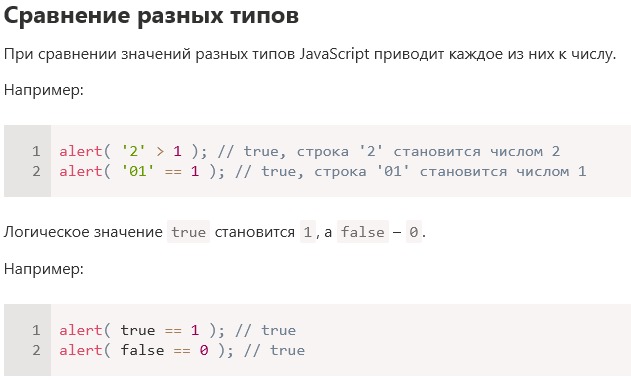
При сравнении значений разных типов JavaScript приводит каждое из них к числу.

Откуда дровишки? Правда о JavaScript написана только в одном месте - в документации языка. Поэтому смотрим доку:
https://262.ecma-international.org/16.0/index.html
EqualityExpression : EqualityExpression == RelationalExpression
 1. Let lRef be ? Evaluation of EqualityExpression.
 2. Let lVal be ? GetValue(lRef).
 3. Let rRef be ? Evaluation of RelationalExpression.
 4. Let rVal be ? GetValue(rRef).
 5. Return ? IsLooselyEqual(rVal, lVal).

Ага, значит, ищем IsLooselyEqual:

The abstract operation IsLooselyEqual takes arguments x (an ECMAScript language value) and y (an ECMAScript language value) and returns either a normal completion containing a Boolean or a throw completion. It provides the semantics for the == operator. It performs the following steps when called:

1. If SameType(x, y) is true, then
   a. Return IsStrictlyEqual(x, y).
2. If x is null and y is undefined, return true.
3. If x is undefined and y is null, return true.
4. NOTE: This step is replaced in section B.3.6.2.
5. If x is a Number and y is a String, return ! IsLooselyEqual(x, ! ToNumber(y)).
6. If x is a String and y is a Number, return ! IsLooselyEqual(! ToNumber(x), y).
7. If x is a BigInt and y is a String, then
   a. Let n be StringToBigInt(y).
   b. If n is undefined, return false.
   c. Return ! IsLooselyEqual(x, n).
8. If x is a String and y is a BigInt, return ! IsLooselyEqual(y, x).
9. If x is a Boolean, return ! IsLooselyEqual(! ToNumber(x), y).
10. If y is a Boolean, return ! IsLooselyEqual(x, ! ToNumber(y)).
11. If x is either a String, a Number, a BigInt, or a Symbol and y is an Object, return ! IsLooselyEqual(x, ? ToPrimitive(y)).
12. If x is an Object and y is either a String, a Number, a BigInt, or a Symbol, return ! IsLooselyEqual(? ToPrimitive(x), y).
13. If x is a BigInt and y is a Number, or if x is a Number and y is a BigInt, then
   a. If x is not finite or y is not finite, return false.
   b. If ℝ(x) = ℝ(y), return true; otherwise return false.
14. Return false.

Вот и весь ответ. В JS есть чёткий алгоритм нестрогого сравнения, который назван IsLooselyEqual, а всё остальное - отсебятина.

null == undefined; // вернёт true

В Javascript при нестрогом сравнении null равен undefined не потому, что они оба привелись к 0, а потому что в пункте 2 чётко сказано, если первый оператор null и второй оператор undefined, то нужно вернуть true.
Show full...
+1
25

Популярность Vue.js в России в 2025 году

В комментах на ютубе поспорил о популярности Vue JS. Мне доказывали, что балом правит Реакт, а Vue где-то на задворках. Увы, реакт-разработчики варятся в своём котле и не видят текущих тенденций. А текущая тенденция такова, что в России Вьюха постепенно откусывает кусок у Реакта.

Для анализа выбрал тематику недвижимости - застройщики. Список крупнейших застройщиков России в 2025 году, данные с Домклика, по количеству сделок:
1. ПИК
2. Самолет
3. ЮгСтройИнвест
4. Холдинг Setl Group
5. ССК
6. Страна Девелопмент
7. ГК ФСК
8. Гранель
9. ЛСР
10. DOGMA
11. АКВИЛОН
12. Домостроительный комбинат
13. ГК Кортрос
14. Талан
15. ГК "А101"
16. ЭНКО
17. Брусника
18. ГК Расцветай
19. GloraX
20. DARS Development
Смотрим сайты:
pik.ru - React
samolet.ru - Vue
gk-usi.ru - другое
setlgroup.ru - Vue
sskuban.ru - Vue
strana-development.ru - другое
fsk.ru - Vue
granelle.ru - Vue
lsr.ru - React
dogma.ru - React
group-akvilon.ru - Vue
dsk1.ru - Vue
kortros.ru - Vue
ижевск.талан.рф - Vue
a101.ru - Vue
enco.ru - другое
moskva.brusnika.ru - Vue
гкрасцветай.рф - другое
glorax.com - Vue
dars.ru - React

Ну как вам? Реакт - 4 сайта, VueJS - 12 сайтов. Сам не ожидал таких результатов, тут Вью опережает Реакт в 3 раза! Но обычно примерно 50/50 или даже чуть больше у Реакта.

Единственная сфера деятельности в России, где засилье Реакта - это банки. Так сложилось по историческим причинам, там началось всё с Реакта и остальные банки стали как обезьянки повторять и ставить себе Реакт тоже.

Многие React-разработчики просто не пробовали что-то другое. Я пробовал React, я пробовал Vue и сделал свой выбор в пользу второго. Стоит начать писать код на Vue и к React-у не захочется возвращаться.
Show full...
+3
117

How to use Quill Editor with Nuxt 3 and SSR (Vue)

If you try to use Quill Editor with Nuxt 3 when rendering a page in SSR you will get this error:
500 document is not defined.
That means NodeJS doesn't have the global variable 'document'. Because SSR rendering is executed in
a NodeJS environment, not a browser.

The sad fact: <client-only> won't help with this problem. The problem with quill's code is that during import, it assumes it's being executed in the browser. I hope you remember that the code imported from the module is not just imported, but executed, i.e. the authors of Quill wrote it so that the 'document' object is immediately accessed there. Very bad.

One solution is to disable SSR, but its an awful solution. But the second solution is to use dynamic JS imports.

My <script lang="ts" setup> in QuillEditor.vue in Nuxt 3 project:
import 'quill/dist/quill.core.css';
import 'quill/dist/quill.snow.css';
// import Quill from 'quill'; // SSR problem with 'document', need to use dynamic import
import type Quill from 'quill';

const elemForQuillEditor = ref<HTMLDivElement|null>(null);

let editor: null|Quill = null; // Do not store in ref() - it causes bugs!

// ...

async function createQuillAndSetListeners() {
  const Quill = (await import('quill')).default; // This is most important thing - usage of JS dynamic import

  if (!elemForQuillEditor.value) return;
  editor = new Quill(elemForQuillEditor.value, {
    theme: 'snow',
    modules: {
      history: {
        delay: 2000,
        maxStack: 500,
        userOnly: true,
      },
      toolbar: {
        container: [
          ['bold', 'italic', 'underline', 'strike'],
          ['link'],
          [{ list: 'ordered' }, { list: 'bullet' }],
          [{ script: 'sub' }, { script: 'super' }],
          [{ header: [1, 2, 3, 4, 5, 6, false] }],
          [{ color: [] }, { background: [] }],
          ['clean'],
          ['undo', 'redo'],
        ],
        handlers: {
          undo() {
            editor?.history.undo();
          },
          redo() {
            editor?.history.redo();
          },
        },
      },
    },
    placeholder: props.placeholder,
  });
  
  editor.on('text-change', () => {
    if (!editor) return;
    // ... my other code
  });
}

// ...

onMounted(createQuillAndSetListeners);

Now your Quill editor will work in Nuxt 3 even during SSR!
+2
91

Хитрость spread-синтаксиса в JS

А вы знали, что теоретически spread-синтаксис в JS можно применять почти к любому типу.
Вот пример "обычного" использования:
// Массив спредится
console.log([...[1, 2, 3]]); // [1, 2, 3]
// Строка спредится
console.log([...'Famabara']); // ['F', 'a', 'm', 'a', 'b', 'a', 'r', 'a'] 
Но если попытаться заспредить number, то будет ошибка:
console.log([...555]); // Uncaught TypeError: 555 is not iterable
Не является iterable.
Так давайте сделаем iterable!
Number.prototype[Symbol.iterator] = function * () {
  yield 'Фамабара';
  yield 'лучше';
  yield 'всех';
}

console.log([...555]); // ['Фамабара', 'лучше', 'всех']
Мы успешно заспредили number! Толку от этого никакого, на сам факт забавен.
Можно джунов за собесах мучить :)
+4
201

TypeScript скоро станет в 10 раз быстрее

Андерс Хейлсберг (автор Тайпскрипта) опубликовал пост в блоге:
https://devblogs.microsoft.com/typescript/typescript-native-port/

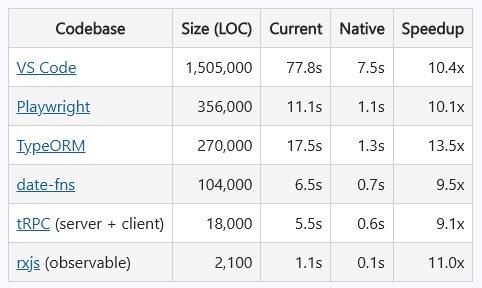
В общем, TypeScript скоро станет в 10 раз быстрее, вернее, он уже стал таким, просто пока эту версию не сделали общедоступной.

Вот такой прирост скорости компиляции крупных проектов теперь показывает tsc:
Как видно, прирост на порядок - т.е. примерно в 10 раз. Достигается это за счет использования Golang для работы tsc, а не JS. Сам по себе JS быстрый, но он упирается в один поток. А кто писал на Go, то знает, насколько легко там запустить горутину. Теперь tsc будет использовать несколько имеющих потоков, что и даст прирост скорости компиляции.

Обратите внимание, это полноценная работа tsc, а не как у esbuild, где только транспиляция без проверки типов.

На момент написания этого поста текущая версия TypeScript - 5.8.2. Следующая мажорная версия - 6-я - будет всё ещё на JS-е, а вот 7-я версия будет уже на "натив